3D Moon Swing Shadow Box Laser Cut File: A Guide to Perfect Results
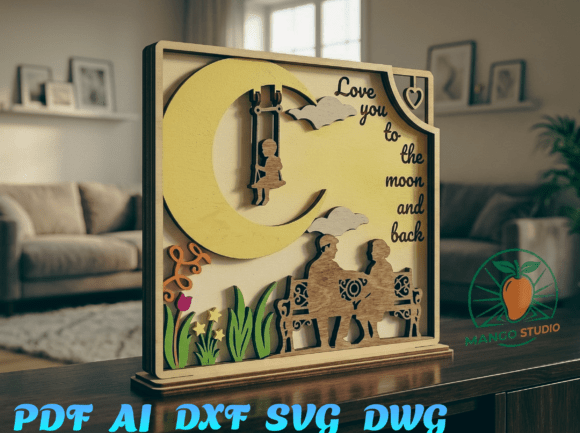
There is a unique warmth in handcrafted decor that mass-produced items simply cannot replicate. When you decide to create a 3D Moon Swing Shadow Box Laser Cut File project, you are choosing to bring a touch of magic into your home. This specific design, featuring a child on a moon swing and a couple on a bench under the "Love you to the moon and back" theme, offers a stunning visual narrative. It transforms flat walls into cozy living spaces, making it an ideal choice for nurseries, romantic gifts, or personal studios. However, the difference between a professional-looking shadow box and a frustrating assembly often lies in the details before the laser even fires.
Understanding the Design and Its Potential
This particular file is not just a single image; it is a multilayered composition designed to create depth. The concept relies on stacking cut pieces to simulate distance and dimension. When executed correctly, the layers interact with light and shadow to make the moon swing appear as if it is floating in space. The dimensions are optimized at 350 mm width by 315 mm height, a size that fits standard frames while remaining substantial enough to be a focal point. Whether you are a hobbyist looking for a weekend project or a small business owner expanding your product line, understanding the mechanics of this file is crucial for success.
Common Pitfalls in Material Selection
One of the most frequent mistakes creators make is ignoring material thickness specifications. The 3D Moon Swing Shadow Box Laser Cut File is optimized for 3 mm plywood, MDF, or acrylic. While it might seem convenient to use whatever scrap material is lying around, deviating from this recommendation can ruin the structural integrity of the final piece. If you choose a material that is too thick, such as 5 mm or 6 mm, the layers will not nest properly. The gaps between the moon, the swing, and the background will become too wide, breaking the illusion of depth and making the assembly look clumsy.
Conversely, using material that is too thin, like 1.5 mm, can result in fragile components that bend or warp during handling. The delicate features of the child on the swing or the couple on the bench may snap when you attempt to remove them from the backing board. To avoid these issues, always verify your stock against the file's requirements. Stick to high-quality 3 mm birch plywood or MDF for a clean finish, or opt for acrylic if you desire a translucent, glowing effect when backlit. Consistency in material thickness ensures that the layering logic remains intact, preserving the artistic intent of the design.
File Format Compatibility and Software Setup
Another area where projects often stall is file management. You will receive this design in multiple formats: SVG, DXF, AI, PDF, and DWG. While having options is beneficial, confusion can arise if you do not select the correct format for your specific machine. For instance, if you are using LightBurn or Glowforge software, the SVG or DXF formats are typically the most reliable for vector cutting. Attempting to import a rasterized PDF without proper tracing settings can lead to jagged edges or failed cuts.
A common oversight is failing to check the nesting within the file before sending it to the cutter. Some users assume the layers are automatically separated, but you must ensure each layer is assigned to the correct cutting path. If the background, the middle layers, and the foreground elements are all set to cut simultaneously without proper spacing, you risk burning through adjacent layers. Take a moment to review the file in your software, color-coding the different depths if necessary. This step ensures that the intricate details of the moon and the figures remain crisp and distinct.
The Importance of Assembly Precision
The true magic of a shadow box happens during assembly. Many beginners rush this phase, gluing layers together without checking alignment. Because the design relies on a 3D depth effect, even a millimeter of misalignment can throw off the perspective. The child on the moon swing should appear to be suspended above the background, not stuck to it. If the layers are glued unevenly, the final piece may lean to one side or fail to fit into the frame.
To achieve a professional result, use a dry-fit method first. Arrange all the cut pieces in order without adhesive to visualize the final stack. Check that the center points align perfectly. Once satisfied, apply a minimal amount of glue to the corners or use double-sided foam tape for a cleaner application. This approach prevents excess adhesive from seeping out onto the visible surfaces, which can be difficult to clean off delicate wood or acrylic. Patience here pays off significantly in the final presentation.
Evaluating Quality Before Purchase or Download
Before committing to any digital download, it is wise to evaluate the source and the file quality. Reputable sources like Mango Studio provide files that have been tested for real-world applications. Look for clear documentation regarding dimensions and material recommendations. A good file package will include instructions or a preview of how the layers interact. Avoid files that lack these details, as they often indicate poor testing and can lead to wasted materials and time.
Consider the intended use of your finished product. If this is for a nursery, ensure the materials used are non-toxic and sanded smooth to prevent splinters. For a romantic gift, the precision of the cut lines reflects the care put into the creation. By taking the time to understand the file, selecting the right materials, and assembling with precision, you transform a simple digital download into a cherished piece of art. The 3D Moon Swing Shadow Box Laser Cut File is a versatile tool, but its potential is only unlocked when approached with attention to detail and a commitment to quality craftsmanship.